
Inspect archival film. Document its condition.
Use the new insight to improve preservation and access!
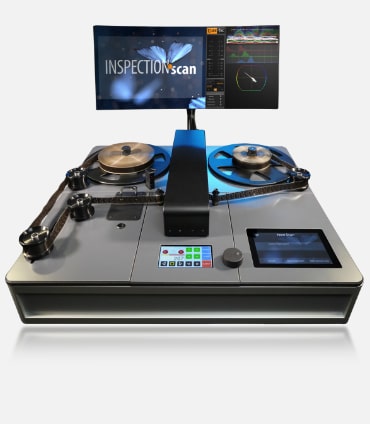
INSPECTIONscan helps media archives make their analog film holdings accessible. It generates digital access copies on the fly for viewing and exploring film content, alongside detailed inspection reports for preservation planning.
From film reel to informed decision
At a Glance
The Challenge
Large film collections need reliable condition data before further preservation and access decisions.
The Solution
INSPECTIONscan combines careful film transport, sensor-based inspection and digital access in one workflow.
Results
A documented condition report and a viewing copy for each inspected reel.
What INSPECTIONscan documents
- Damaged or missing perforations
- Bad cement and tape splices
- Film shrinkage profile
- Inspection report
- Digital access copy
- 16mm and 35mm film (17.5mm magnetic sound option)
Measurements and Inspection Report
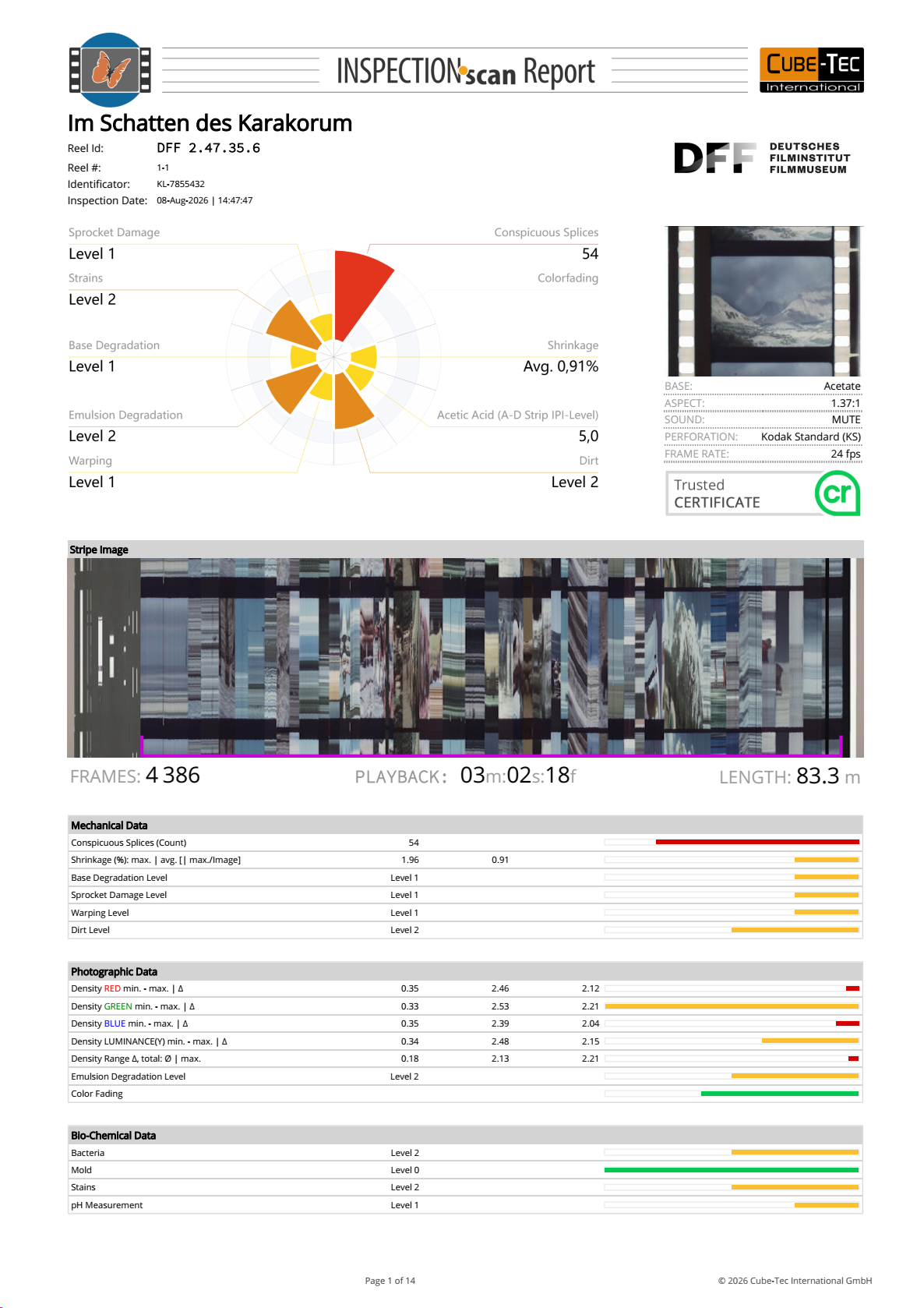
QUADRIGA INSPECTIONscan generates an inspection report alongside a digital Access Copy. Measurements, detected events and operator observations document the condition of each reel.
What the report contains
Mechanical and photographic condition
- Damaged or missing perforations
- Splice condition, position and count
- Frame-accurate shrinkage profile
- Optical density and colour-density shifts
Reel information and documentation
- Frame and shot counts
- Film length
- Operator markers and comments
- Mechanical and photographic assessments
Further review with QUADRIGA QC•View for Film
Frequently Asked Questions about INSPECTIONscan
INSPECTIONscan is designed for fast assessment of large holdings of film reels. It gives you a quick, consistent overview of the condition and characteristics of film material across a collection. It is not intended to replace a final archival scan.
The INSPECTIONscan system provides complete sprocketless transport. It even does not use a capstan drive to avoid dirt getting pressed into the emulsion. The filmpath with its large diameter rollers enables contact-free scanning of the emulsion layer to avoid any degradation of the emulsion.
INSPECTIONscan automatically generates both human-readable and machine-readable reports. The standard outputs include PDF and JSON, with XML available if required.
INSPECTIONscan delivers nearly 2k images in visually lossless (not mathematical lossless) in the H.265, H.264 and ProRes formats in MOV or MP4 video container out of the box. It can even export two different video formats simultaneously: one copy in full edge to edge format for archivists and a second video copy containing only the image frame for an end user.
Yes. INSPECTIONscan can record 35, 17.5 and 16 mm magnetic film by using the different Magnetic Head Assemblies which can be ordered optionally. We provide support for full coated and striped COMMAG and SEPMAG film with different track layouts and audio channels.
Yes. INSPECTIONscan can digitise the soundtrack and the frame images simultaneously.
In a standard 8 hour shift one INSPECTlONscan operator can evaluate and digitise about 100 reels by using 3 INSPECTIONscan in parallel. A peak of 50 reels per INSPECTIONscan is possible. The exact throughput depends on reel length, condition and the amount of manual documentation required.
Yes. The transport speed can be adjusted dynamically during inspection, including reductions down to one frame per second when highly fragile or mechanically brittle film material requires slow movement.
If a film splice breaks, you do not have to restart the reel from the beginning. Rejoin the film directly on the table and INSPECTIONscan can continue from the break point. The access copy will be frame-accurate, and the inspection report will document automatically the new splice.
Yes. INSPECTIONscan measures RGB values across the film and uses those measurements to document color changes and fading automatically in the inspection results.
QC•View is a separate review application that works with the access copy and synchronises all time-based inspection metadata generated by INSPECTIONscan. It lets operators navigate the film, review detected events and measurements, add or assess annotations, and perform detailed quality control without occupying the scanner workstation.
The Inspection Report Enrichment Extension enables operators to fine-tune the inspection results even after scanning. In QC•View, an operator can review findings, edit existing events, add comments or annotations, and then generate an updated inspection report containing those changes.
Two INSPECTIONscan tables can be synchronised with frame accuracy. The second INSPECTIONscan can act as a sound follower, playing back the separate audio in frame-accurate synchronisation with the picture. With a single INSPECTIONscan, the silent picture and separate audio can be digitised sequentially, then combined with frame accuracy in an editor.
Yes. INSPECTIONscan allows viewing images like CinemaScope widescreen in a flat aspect ratio.
Yes.
Yes, with the optional PTR roller set a dry cleaning of loose dirt can happen in parallel.
Ready to explore automated film inspection?

Discover how QUADRIGA INSPECTIONscan can support the inspection and documentation of your film collection.
For more information or questions about your workflow, contact the Cube-Tec team.
INSPECTIONscan provides deep insights to the condition of your film collection with precise and comprehensive documentation down to a detail level not feasible with manual work."